
I’ve made a variety of tools in python with NMAP that involve both the nmap library and using nmap commands with the os library, depending on the application, but this time, I decided to make one that uses both for maximization.
Here’s the issue: if we use ‘namp -A’ with no additional host-discovery parameters, it tends to miss hosts in the host discovery. But if we use ‘nmap -A -Pn ‘, we skip host discovery by assuming that they’re all up, but we run into the problem that this process now takes a very long time and it tends to miss hosts that are detected with the -sn switch. To address the issue, the premise is simple: discover the host with the -sn switch, and then perform the Aggressive scan once the host is discovered. To do this, I we need the nmap library, the os library and a function that I created with the iptools library. My nmapcustom import contains the function that converts CIDR notation of ip addresses into a list of individual ips.
Here is the main script:
Please be aware that most cyber security tools are for python2 currently.
'''
This tool is for the automation of nmap scanning. This tool uses a two fold method for reliable host discovery, followed up by performing an
aggressive scan only if the host is up, as determined by the -sn switch. The traditional -A switch tends to miss hosts that the -sn switch can
identify, but the -Pn switch which assumes all hosts are up, takes exponentially more time that this program. This program solves the issue
of maximizing both time and reliability.
'''
# Import nmap module and nmap custom that contains a few functions for converting raw inputs to lists.
import nmap
import nmapcustom
import os
# Create a PortScanner object
nm = nmap.PortScanner()
# The ip addresses need to be added individually or as a CIDR block, as strings, and separated by commas.
ipAddrs = str(raw_input('What ip addresses would you like to scan? Enter ranges with CIDR notation or as individuals, and all seperated by commas: '))
# Define a list of ports. Again, these need to be seperated by commas.
portString = str(raw_input('\nWhat ports would you like to scan? Seperate with commas and groups by dashes: '))
# Convert string of ips to a list
ipList = nmapcustom.ips(ipAddrs)
# Iterate through the IP addresses in ipAddrs
for ipAddr in ipList:
	# First, we will check to see if the host is up.
	# Then we will print the ip being scanned to visually track progress.
	print 'working on ip ' + ipAddr
	scan = nm.scan(ipAddr, arguments = '-sn')
	if scan['nmap']['scanstats']['uphosts'] == '1':
		# Print the current IP address being scanned
		print "**********\n[+] UPHOST FOUND! Results for the following IP address : ", ipAddr, "\n**********"
		# Conduct the scan and print the output that would happen if we were to manually enter the command in the terminal.
		print "Now running \'nmap -A -T5 -p " + portString + " "  + ipAddr + "\'"
		print os.system('nmap -A -T5 ' + '-p' + portString + ' ' +  ipAddr)
Here’s the nmapcustom module:
def ips(ipListStr):
	import iptools
	'''
	Takes a traditional nmap string of ips and converts it to a list of ips. Only takes individuals or CIDR notation.
	'''
	ipListPrimary = ipListStr.split(',')
	ipListSecondary = []
	for ipElt in ipListPrimary:
		if '/' in ipElt:
			ipRange = iptools.IpRangeList(ipElt)
			ipIter = ipRange.__iter__()
			while True:
				try:
					ipListSecondary.append(next(ipIter))
				except:
					break
		else:
			ipListSecondary.append(ipElt)
		return ipListSecondary
Now that we have our code established, let’s take a look at a scan performed on a local subnet. Let’s see what happens when we run the code:
What ip addresses would you like to scan? Enter ranges with CIDR notation or as individuals, and all seperated by commas: 192.168.1/24

What ports would you like to scan? Seperate with commas and groups by dashes: 1-10000
working on ip 192.168.1.0
working on ip 192.168.1.1
**********
[+] UPHOST FOUND! Results for the following IP address :  192.168.1.1
**********
Now running 'nmap -A -T5 -p1-10000 192.168.1.1'
Starting Nmap 7.70 ( https://nmap.org ) at 2019-03-16 14:31 CDT
Nmap scan report for router.asus.com (192.168.1.1)
Host is up (0.0046s latency).
Not shown: 9995 closed ports
PORT     STATE SERVICE        VERSION
53/tcp   open  domain         (unknown banner: Version: recursive-main/22386077)
| dns-nsid:
|   id.server: Answerx_On_austx-dns-cac-307
|_  bind.version: Version: recursive-main/22386077
| fingerprint-strings:
|   DNSVersionBindReqTCP:
|     version
|     bind
|_    Version: recursive-main/22386077
80/tcp   open  http           ASUS WRT http admin
|_http-server-header: httpd/2.0
|_http-title: Site doesn't have a title (text/html).
1990/tcp open  tcpwrapped
3394/tcp open  d2k-tapestry2?
5473/tcp open  apsolab-tags?
1 service unrecognized despite returning data. If you know the service/version, please submit the following fingerprint at https://nmap.org/cgi-bin/submit.cgi?new-service :
SF-Port53-TCP:V=7.70%I=7%D=3/16%Time=5C8D4F25%P=x86_64-pc-linux-gnu%r(DNSV
SF:ersionBindReqTCP,4D,"\0K\0\x06\x81\x80\0\x01\0\x01\0\0\0\0\x07version\x
SF:04bind\0\0\x10\0\x03\xc0\x0c\0\x10\0\x03\0\0\0\x01\0!\x20Version:\x20re
SF:cursive-main/22386077");
Service Info: CPE: cpe:/o:asus:wrt_firmware

Service detection performed. Please report any incorrect results at https://nmap.org/submit/ .
Nmap done: 1 IP address (1 host up) scanned in 163.34 seconds
0
working on ip 192.168.1.2
working on ip 192.168.1.3
.
.
.
working on ip 192.168.1.18
working on ip 192.168.1.19
**********
[+] UPHOST FOUND! Results for the following IP address :  192.168.1.19
**********
Now running 'nmap -A -T5 -p1-10000 192.168.1.19'
Starting Nmap 7.70 ( https://nmap.org ) at 2019-03-16 14:35 CDT
Warning: 192.168.1.19 giving up on port because retransmission cap hit (2).
Nmap scan report for Xans-MBP-2 (192.168.1.19)
Host is up (0.012s latency).
All 10000 scanned ports on Xans-MBP-2 (192.168.1.19) are filtered (6493) or closed (3507)

Service detection performed. Please report any incorrect results at https://nmap.org/submit/ .
Nmap done: 1 IP address (1 host up) scanned in 28.75 seconds
0
working on ip 192.168.1.20
.
.
.
As we can see from the output, it performs as expected. However, we find something extremely interesting when we find 192.168.1.80:
working on ip 192.168.1.80
**********
[+] UPHOST FOUND! Results for the following IP address :  192.168.1.80
**********
Now running 'nmap -A -T5 -p1-10000 192.168.1.80'
Starting Nmap 7.70 ( https://nmap.org ) at 2019-03-16 14:49 CDT
Warning: 192.168.1.80 giving up on port because retransmission cap hit (2).
Nmap scan report for BRW54137933F089 (192.168.1.80)
Host is up (0.0049s latency).
Not shown: 9904 closed ports, 89 filtered ports
PORT     STATE SERVICE    VERSION
21/tcp   open  ftp        Brother/HP printer ftpd 1.13
| ftp-anon: Anonymous FTP login allowed (FTP code 230)
| total 1
| -r--r--r--   1 root     printer   4096 Sep 28  2001 CFG-PAGE.TXT
|_----------   1 root     printer      0 Sep 28  2001 Deep-Sleep------
23/tcp   open  telnet     Brother/HP printer telnetd
80/tcp   open  http       Debut embedded httpd 1.20 (Brother/HP printer http admin)
|_http-server-header: debut/1.20
| http-title: Brother HL-3170CDW series
|_Requested resource was /general/status.html
443/tcp  open  ssl/https?
515/tcp  open  printer
631/tcp  open  ipp?
9100/tcp open  jetdirect?
Service Info: Device: printer

Service detection performed. Please report any incorrect results at https://nmap.org/submit/ .
Nmap done: 1 IP address (1 host up) scanned in 235.20 seconds
First off, we can see that this is a printer (which often have the default telnet cridentals set) and this one has web access. Just for fun, I decided to go to access it in a webpage, just to see if I could login with the default credentals and this is what I was greeted with:
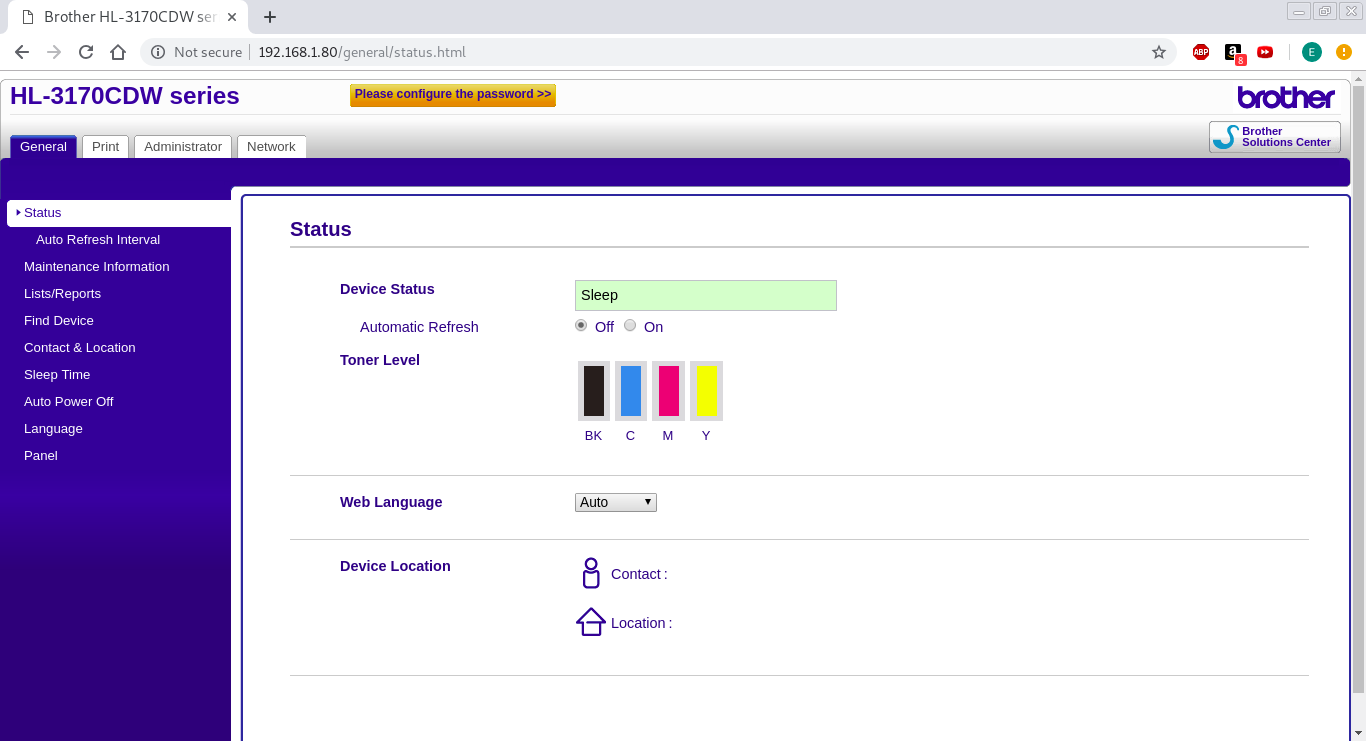
Upon inspection, I appear to have full access without loging in…that’s scary. I notice the bright orange/yellow button on the top of the screne and when I click on it, this is where it takes me:
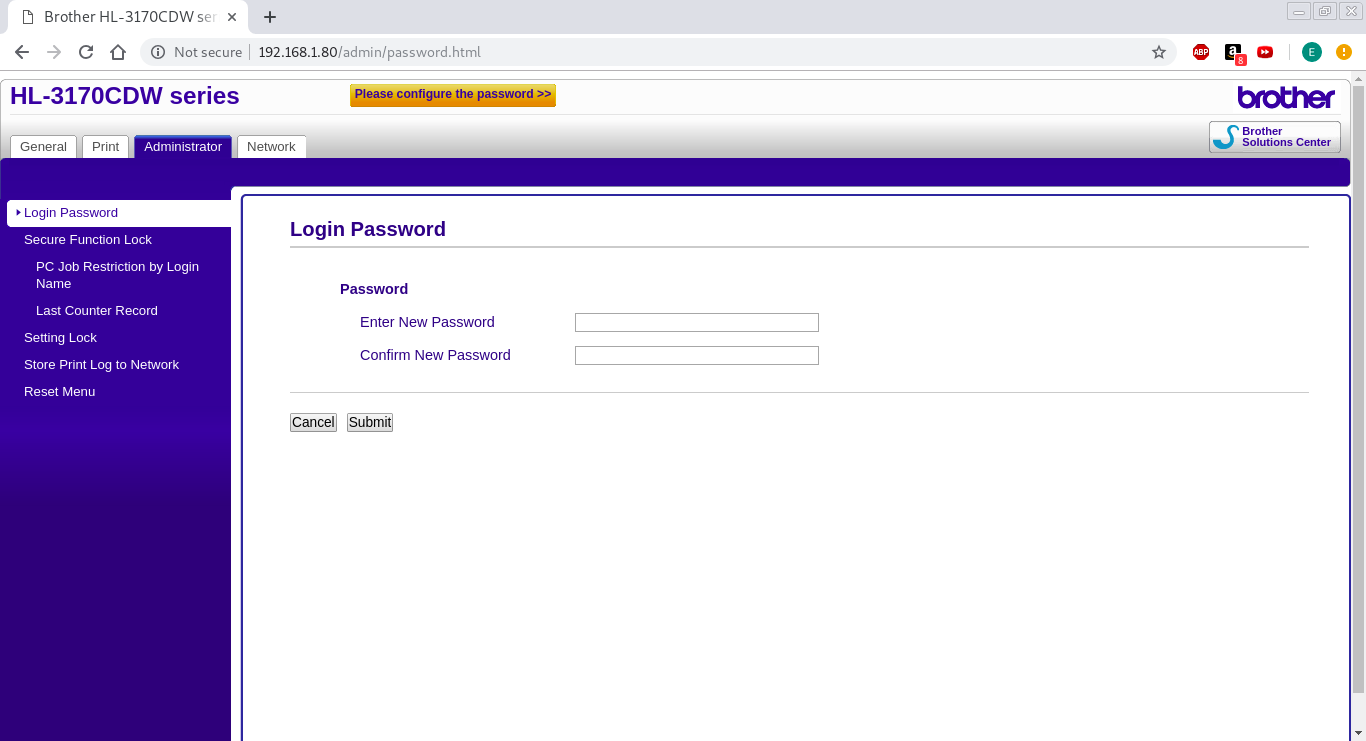
Effectively, I could now change the password and have full control of the printer (which I won’t).
As is true with all IoT devices, make sure your harden them! They’re often one of the most vulnerable aspects of any network.
 Cyber's Cybersecurity Portfolio